AI Agent for Accounting
What an AI agent actually does in an accounting context, which tasks it handles well, which it should never touch, and how to evaluate one before letting it near your books.

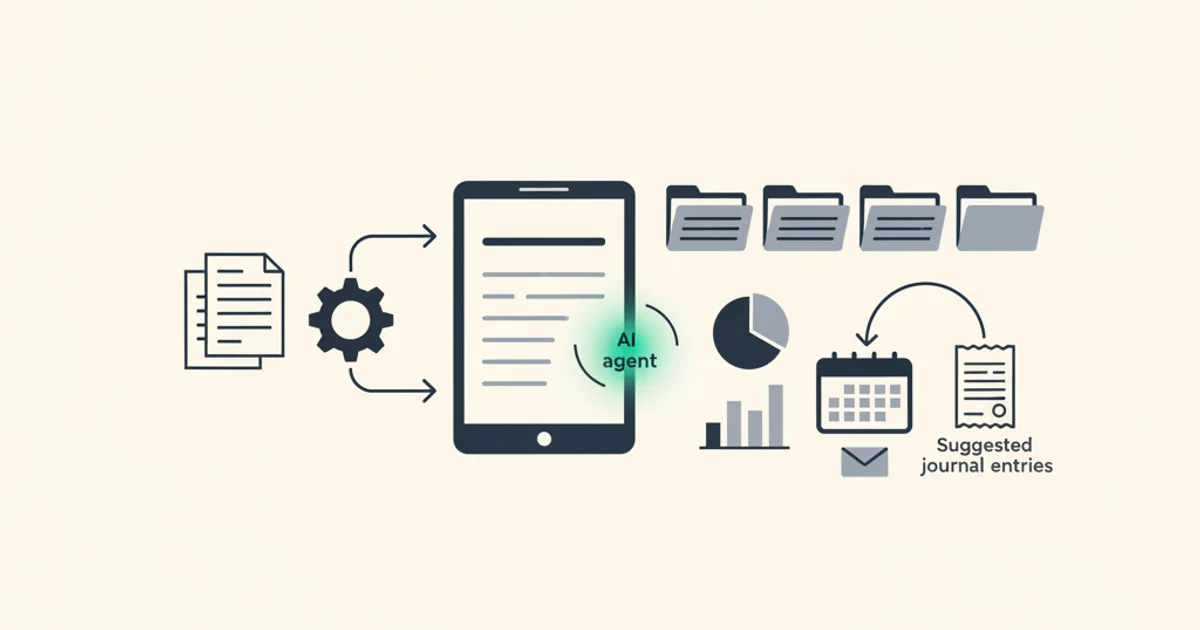
The phrase "AI agent" started showing up in accounting software marketing in late 2024 and by 2026 it is attached to nearly every product in the category. Most of the time it means one of three things: a chatbot you can ask questions to, a workflow that runs a fixed set of steps in sequence, or, in a smaller number of cases, a genuine multi-step autonomous system that can plan and act across tools. The difference matters a lot when you are deciding whether to trust something near your books.
This piece takes an honest look at what AI agents actually do in an accounting context: which tasks they are well-suited for, which ones they should never touch, what the real failure modes are, and how to evaluate one before putting it in production.
What "AI agent" actually means in 2026
An AI agent, in the technical sense, is an LLM-based system that can decompose a goal into steps, execute those steps using available tools, observe the results, and decide what to do next. The key word is "decide." A traditional workflow engine executes a fixed sequence. An agent can branch, retry, escalate, or choose between multiple approaches depending on what it encounters.
In accounting software, this plays out in a few specific ways. An invoice ingestion agent does not just run OCR and return a JSON blob. It receives a document, extracts structured fields, checks those fields against known vendor patterns, flags discrepancies, proposes a GL account mapping based on line item descriptions and past behavior, attempts to match the invoice against open purchase orders, and surfaces anything that does not resolve cleanly. Each of those steps can produce outputs that change what the next step does.
This is meaningfully different from a classifier that labels a document as "invoice vs. receipt" or an OCR tool that pulls text from a PDF. Those are single-step tools. An agent chains them together with decision logic in between.
That said, most products that call themselves "AI agents" for accounting are somewhere on a spectrum. A rule-based workflow with a language model bolted onto one step is not the same as a fully autonomous system. When evaluating a vendor, the right question is not "do you have an AI agent?" but "what decisions does the system make autonomously, and what decisions does it ask a human to make?"
What accounting tasks are genuinely agent-appropriate
The tasks that fit an agent well share a few properties: they are high-volume, structurally repetitive, involve multiple steps that benefit from coordination, and are forgiving of occasional errors that a human reviewer catches before anything is finalized.
Invoice ingestion and field extraction. This is the clearest fit. Receiving a document, identifying the vendor, extracting invoice number, dates, amounts, tax breakdowns, and line items, normalizing vendor names so AMZN, Amazon Web Services, and Amazon.com Services LLC all resolve to the same entity, and routing the result to the right place. A well-built extraction agent handles this across hundreds of document layouts without per-vendor configuration. Our AI processing feature covers what a real extraction pipeline looks like for high-volume invoice workflows.
Category and GL account suggestion. Given a line item description, the agent can propose a general ledger account based on your chart of accounts and past coding patterns. This is a suggestion, not a posting. The value is that it gets the right answer on routine items without a human touching it, and it surfaces the non-routine ones for review. Over time, the suggestion quality improves as the agent builds a history of how your team codes specific vendors and line item types.
Three-way matching drafts. Purchase order, goods receipt, and invoice. An agent can pull all three, compare amounts and quantities, flag discrepancies above a tolerance, and propose whether to approve or hold. It cannot make the approval decision, but reducing "did the PO match the invoice?" to a yes/no review with supporting evidence is a real time saver for a team processing hundreds of invoices a week.
Reconciliation drafts. Matching bank statement transactions to invoices based on amount, date range, and vendor is a pattern-matching problem with well-defined rules. An agent can run the prefilter (currency match, date proximity, amount tolerance) and then apply a more nuanced judgment on near-matches. The Inbox Ledger reconciliation engine uses exactly this two-stage approach, and the resulting proposed matches need one click to confirm or reject rather than manual line-by-line comparison.
Duplicate detection. The same invoice arriving twice is a common problem, especially when vendors email invoices and also post them to a portal that someone downloads separately. An agent that hashes the document, checks against existing records, and flags potential duplicates before posting prevents double-payment without anyone having to run a duplicate-detection query manually.
What tasks are NOT agent-appropriate
This is the part that most accounting AI marketing skips over.
Final approval of invoices and payments. Approval is an act with consequences: it authorizes payment, creates a liability, and in most organizations requires a named individual to be accountable. An agent cannot be held accountable. It cannot explain a decision to an auditor in the way a controller can. Auto-approval workflows that skip human sign-off on payment runs are a control failure, regardless of how confident the model says it is.
Audit sign-off and financial statement certification. The person who certifies a financial statement is personally liable for its accuracy. This is a legal and fiduciary role, not a data processing task. No agent should be in this chain as anything other than a tool that prepares materials for a human to review.
Tax strategy decisions. Tax strategy involves judgment about risk tolerance, regulatory interpretation, the specific facts of a transaction, and the client's overall situation. These are not pattern-matching problems. An agent that suggests a tax treatment based on training data is drawing on general patterns, not analyzing the specific regulatory nuances of your situation. Use AI to surface relevant information, not to make the call.
Journal entries in closed periods. Anything that touches a finalized period needs an audit trail of human approval because it changes already-reported numbers. Agents can prepare the proposed entry, but posting it should require explicit human confirmation with a documented reason.
Anything where a wrong answer has a material or irreversible consequence. A miscategorized office supply is a minor error a reviewer catches on the next pass. An incorrectly posted revenue recognition entry in a quarter-close can affect public filings. The appropriate level of human review scales with the materiality and reversibility of the decision.
Real-world examples
Invoice agent. A company receives 400 invoices a month via email, portal download, and forwarded PDFs. An invoice agent connects to the email inbox, processes attachments as they arrive, extracts structured fields, checks against the vendor master, and queues each invoice for approval with the GL account already pre-populated. Reviewers approve or adjust; nothing posts until they do. The agent handles the 80 percent of invoices that are routine, and the reviewers spend their time on the 20 percent that need judgment. Time to process drops from three days to same-day, and the GL coding quality goes up because the agent applies consistent rules rather than depending on whoever happens to handle a given invoice.
Expense categorization agent. An employee submits a stack of receipts after a business trip. The agent reads each receipt, identifies the merchant, and proposes a category from the company's expense policy. Common cases, like a restaurant receipt categorized as "Meals: Client Entertainment," are auto-coded. Edge cases, like a purchase at a hardware store where the description does not clearly indicate whether it was for a home office or a client site, are routed to the employee with a question. Policy violations are flagged before submission. The approver sees a batch with everything pre-coded rather than a pile of bare receipts.
Reconciliation assistant. At month-end, the finance team has a bank statement and a set of outstanding invoices. A reconciliation assistant runs the two-stage matching process, proposes match pairs with a confidence score and a brief reason for each, and presents the list for confirmation. High-confidence matches are confirmed in bulk. Low-confidence and unmatched items go into a work queue. The reconciliation that used to take a day takes an hour, and the team finishes with documented evidence of the matching process rather than a spreadsheet where the logic lives only in someone's head.
If you want to see this kind of pipeline running on real documents, Inbox Ledger's AI-powered inbox processing handles the full ingestion-to-reconciliation flow. The Anthropic-powered extraction approaches behind these tools follow the same grounding principles described here.
Building versus buying
The honest comparison looks like this.
Build if: your document mix is so unusual that commercial tools fail on a significant fraction of your volume; you have the ML engineering capacity to maintain a model as invoice formats change; you need integration with internal systems that no off-the-shelf vendor connects to; or you have enough proprietary training data that a custom model would substantially outperform general-purpose ones.
Buy if: you need something running within weeks; your vendor mix is broadly similar to other businesses in your sector; you want someone else to handle the ongoing work as invoice formats evolve; and the per-document cost of a commercial product is lower than the engineering cost of building and maintaining your own.
Most finance teams at companies under a few hundred employees are in the buy category. Custom LLM code for invoice extraction is not a one-time project. Invoice formats change. Vendors update their PDF templates. New document types appear. The ongoing maintenance cost of a homegrown agent is consistently underestimated by teams that have not done it before.
The other dimension is data. A commercial product trained on millions of invoice documents from thousands of vendors will generally extract fields from your invoices more accurately than a model you fine-tune on your own history of a few thousand documents, unless your documents are highly unusual. Before choosing to build, get a sample of your most challenging documents and run them through a commercial product to see where the gaps actually are.
For a broader look at the software category, the accounting automation software guide covers how to evaluate tools across the full AP workflow, not just the AI extraction piece.
Evaluation framework
Before trusting an agent in a production accounting workflow, measure these things.
Field-level extraction accuracy. Overall accuracy numbers hide important failures. Measure precision and recall separately for each extracted field: invoice number, issue date, due date, total, tax amount, vendor name, line item descriptions, line item amounts. A model that nails totals but struggles with multi-line tax breakdowns may be fine for your use case or a showstopper, depending on your VAT requirements.
Confidence calibration. When the model says it is 95 percent confident in an extraction, is it actually right 95 percent of the time? A well-calibrated model's confidence scores are meaningful. A poorly calibrated model gives you high-confidence wrong answers. Test this on a held-out set of labeled documents and plot confidence against accuracy. If the curve is flat, the confidence scores are useless.
Performance on your actual vendor mix. Benchmark results are typically from clean, representative documents. Your actual invoice mix probably includes scanned faxes, PDFs generated by old accounting software with unusual layouts, invoices in multiple languages, and vendors you have used for fifteen years whose templates have evolved. Test on your real documents, not the vendor's demo set.
Latency and throughput. For invoice volumes above a few hundred per month, processing speed matters. An agent that takes 30 seconds per document creates a queue. Understand what "real-time" means in the product's terms, and test it under your actual load.
Failure modes. Ask the vendor: what happens when the model cannot read a document? What happens when confidence is below threshold? What happens when a vendor format it has never seen before comes in? A product that fails quietly is more dangerous than one that fails loudly. You want explicit failure states that route documents to a human queue, not silent low-quality extractions that look plausible.
Audit trail completeness. Every extraction and decision should be logged with the source document, the output, the confidence score, and the action taken (auto-posted, queued for review, rejected). This log is what you show an auditor. If the product cannot produce it, think carefully about whether the time savings are worth the audit risk.
The AICPA has published guidance on using AI in accounting practice that covers due diligence expectations, which is worth reading before committing to any agent-based workflow in a regulated context.
Human-in-the-loop patterns that work
The question is not whether to have humans in the loop, but where and how often.
Confidence gating. The agent processes everything but only auto-posts documents above a confidence threshold you set. Everything below the threshold goes into a review queue. You tune the threshold based on your risk tolerance: tighter for a high-volume, low-materiality expense flow; looser for a critical vendor with complex invoices. This is the most common pattern and works well when volumes are high enough that reviewing everything is not practical.
Exception-only review. The agent handles routine transactions matching established patterns and routes anything new or unusual to a named reviewer. A vendor you have paid every month for two years at roughly the same amount is routine. A new vendor, an unusually large invoice, an invoice in a currency you rarely see, or a line item description that does not match a known category is an exception. This works well when most of your volume is genuinely routine and you want to concentrate review time on the non-routine cases.
Batch approval. The agent prepares a daily or weekly batch of proposed postings. A reviewer approves or rejects each item, or approves the whole batch with a single action after spot-checking. This works best for teams that want predictable review time built into a schedule rather than a continuous review queue.
Dual control for high-value transactions. Above a materiality threshold, require two approvals regardless of agent confidence. This is a standard control in most AP policies and does not need to change just because an agent is doing the data preparation. The agent makes the approval process faster; it does not eliminate the need for it.
The IRS expects businesses to maintain adequate records for tax purposes, including sufficient documentation to support each deduction claimed. IRS Publication 583 describes what constitutes adequate records and how long they must be retained. An agent-based workflow meets this standard if it stores the source document alongside the extracted data and maintains an audit trail of what was posted and when.
Honest limitations
No AI agent review would be complete without the problems.
Hallucination on unclear documents. When a source document is ambiguous, a poorly designed agent fills in what seems plausible rather than flagging uncertainty. For invoice extraction, this typically shows up as fabricated invoice numbers when the original is illegible, wrong amounts when currency formatting is unusual, or invented vendor details when a scanned document has poor contrast. The fix is grounding: the agent should only output fields it can trace to specific text in the source, and any field it cannot ground should surface as uncertain rather than filled with a best guess.
Token cost at scale. Running a capable language model on every page of every document is not free. At high volumes, the cost per document matters for the economics of the workflow. Products that use heavyweight models for every step of extraction are more expensive than those that use lightweight models for routine cases and escalate to more capable models only when needed. Understand the pricing model before you commit at scale.
Brittleness under format changes. An agent trained heavily on a specific vendor's invoice format can degrade significantly when that vendor updates their PDF template. This happens more often than people expect, especially with SaaS vendors that redesign billing regularly. A well-designed agent handles this through general document understanding rather than template matching, but it is worth testing explicitly with recent invoices rather than assuming the demo set is representative.
Overconfidence on novel document types. Language models are trained to produce fluent, confident-sounding outputs. This sometimes means the model is equally confident on a document type it has seen a thousand times and one it has never seen. Confidence scores should be treated as calibrated estimates only when you have empirical evidence that the model is well-calibrated on your specific document mix.
Dependency on data quality. An agent is only as good as what it can read. Scanned documents with poor image quality, thermal receipt photos taken at an angle, or PDFs with non-extractable text layers all degrade extraction quality. Upstream data quality matters as much as model quality. If your document intake has systematic quality problems, solving those matters more than selecting a better model.
Start for free and extract your first 10 invoices without a credit card.
Where this leaves finance teams
AI agents for accounting are real and useful, but the marketing is running about two years ahead of the technology. The tasks they do well today are document processing, field extraction, pattern matching, and workflow routing. These are genuine time sinks in most AP departments, and automating them has real value.
The tasks they should not touch, final approval, audit sign-off, tax judgment, anything with fiduciary consequences, are not going to change any time soon. The question is not whether those decisions need a human, but how much of the preparation work can the agent handle so that the human's time goes to judgment rather than data entry.
If you are evaluating AI accounting software, the questions that matter are: what does the audit trail look like, how is confidence calibrated, what happens on documents below threshold, and can I see benchmark results on a document set similar to mine. A vendor that answers all four questions with specific numbers rather than marketing language is worth taking seriously.
For teams dealing specifically with invoice volume from email sources, our invoice extraction comparison covers what to look for in automated extraction tools and where the current generation of products actually differs from each other.
The honest summary: an AI agent for accounting is a good tool for the work that is repetitive, structured, and high-volume. It is a poor substitute for human judgment where judgment is what the work actually requires. Build your workflow around that distinction and you get the time savings without the control failures.